Is the Samsung 32" Odyssey worth it?
Assess the G55C by its curved QHD format, stated refresh mode and actual desk requirements. Separate listing facts from unverified gaming and comfort claims.

On this page
- The format is the first reason to consider it
- What Samsung's own page lists
- Map the occupied desk, not an empty desktop
- Refresh and game performance need different evidence
- Documents need an actual scaling check
- Dell changes the pixel layout and the stand question
- Essential S3 is another curved format, not the same monitor
- Initial setup should answer the buying question
The game screen is only one part of a shared desk. During the day the same space may hold spreadsheets, calls and a laptop. The G55C is worth considering when its larger curved format serves that whole arrangement, not simply because a gaming photograph looks convincing.
We read the product listing and catalog caption. We did not operate the monitor or establish recurring owner complaints. This closer look keeps the confirmed format separate from picture performance we have not measured.
The format is the first reason to consider it
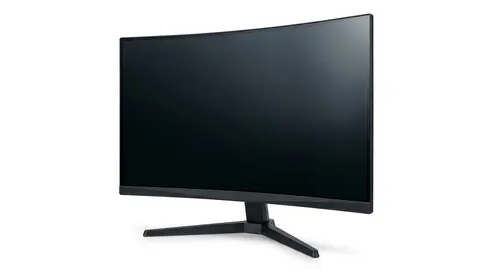
The Samsung Odyssey G55C is identified as a 32-inch QHD curved display. The catalog specifies a 1000R curve, and the checked listing states a maximum 165Hz mode. Those are useful starting facts for a system and room check.
Consider it if a larger curved screen has a defined job in your setup. Skip it if your essential requirement is a different pixel layout or a flat surface.
Samsung 32" Odyssey
Consider the G55C when its larger curved QHD format fits a measured desk and application plan.
What Samsung's own page lists
Samsung's specifications for the G55C list a VA panel, 2560 by 1440 resolution, a refresh rate of up to 165 Hz, a 1 ms MPRT response time, a 1000R curve, HDR10 support and AMD FreeSync. Brightness is listed at 300 cd/m² typical, and static contrast at 2,500:1. The inputs are one DisplayPort 1.2 and one HDMI 2.0, plus a headphone output. The stand is listed as a simple tilt stand with no height or swivel adjustment, and the wall mount pattern is 75 by 75 mm.
Three points are worth reading carefully. First, MPRT is a different measurement from the grey to grey response time that some other brands quote, so it should not be compared directly with them. Second, HDR10 is a signal format, not a brightness certification. VESA's DisplayHDR programme sets measurable tiers, and the page lists none. Third, a tilt-only stand means the screen height is fixed. OSHA says the top of the screen should be at or slightly below eye level, so if the fixed height is wrong for your desk and chair, you will need a stand or an arm that fits a 75 by 75 pattern.
Map the occupied desk, not an empty desktop
Trace the exact screen width and stand depth from the selected model drawing. Add the keyboard, laptop and any equipment that remains on the surface. The diagonal does not describe the support footprint or the clearance behind a curved screen.
For a worked example, a user wants a laptop open beside the monitor for calls. The monitor stand fits the tabletop, but the laptop now sits beyond comfortable reach of the keyboard position. That is a layout problem, not a reason to buy a display solely on refresh rate.
Check the full arrangement before choosing an arm as the answer. An arm has its own supported load, mounting and desk attachment requirements. We did not verify a particular pairing for this model. Obtain those documents if the fit depends on mounting equipment.
Refresh and game performance need different evidence
A 165Hz listing claim identifies a supported display mode to confirm. It does not prove the computer can produce that many frames in the intended game or send the mode through an existing dock.
Write down the computer output, any adapter and the monitor input in order. Find the permitted resolution and refresh combination for that path. A cable with a more prominent label cannot repair a limit in another component.
If game motion matters, use independent measurements of the exact monitor and relevant operating mode. We did not measure pixel transitions, latency or dark scene behavior. Our refresh rate explainer explains why those results cannot be inferred from one headline number.
Documents need an actual scaling check
QHD and diagonal size tell you the format, but software scaling changes the visible text and controls. Assess the applications at the setting you would use. Do not choose from a promotional screenshot with an unusually small interface.
A larger diagonal alone does not establish a worse reading experience. A denser pixel layout can be a reason to compare another monitor, but the practical result still depends on the working arrangement and evidence about the actual display.
Colour critical work also needs appropriate calibrated measurements. A panel label or a gaming position does not establish either suitability or failure for that task. We did not obtain those measurements here.
Dell changes the pixel layout and the stand question
The Dell S2725QS is a 27-inch 4K IPS format. Dell confirms a maximum 120Hz mode and height, pivot, swivel and tilt adjustment. Consider it when those documented differences address the problem you are trying to solve.
Dell S2725QS 27-inch 4K Monitor
Compare Dell for its documented 4K format and stand movement, not an invented color accuracy verdict.
Skip the Dell alternative if the required input mode cannot be confirmed or the application layout does not suit your chosen scaling. Our Odyssey and Dell comparison explains the decision without declaring a measured winner.
Essential S3 is another curved format, not the same monitor
The Samsung Essential S3 caption describes a 27-inch Full HD screen with an 1800R curve. The checked listing states a 100Hz mode. It is a different size, pixel layout and curve, not a verified lighter weight version of the G55C.
Samsung 27" Essential S3
Investigate S3 only when its own curved Full HD format meets the intended setup.
Skip it if the reason for shopping is a QHD workspace or a mode not supported by that option. Do not transfer stand, port or mounting specifications between the two Samsung families.
Initial setup should answer the buying question
Save the listing configuration, model instructions and seller's return conditions. Follow the manufacturer's setup and cleaning advice. Confirm the received display mode, then check the game and document arrangement that motivated the purchase.
The monitor guide and shortlist provide related reading. No arbitrary arm length viewing rule is prescribed here; use appropriate workstation guidance and seek advice for persistent discomfort.
Be careful with
Buying a curve for a promised health effect or assuming a graphics card tier guarantees the intended gaming result. Neither claim was established in this research.
Check the current price on Amazon after obtaining the physical drawing and confirming the output mode. If measured motion or color is the deciding requirement, seek that evidence before choosing the G55C on its format alone.
Questions people ask
Does it need a particular graphics card?
Check the intended resolution and refresh mode through the actual output. We did not benchmark games or approve a universal mid range graphics configuration.
Is the curve better for comfort?
We did not establish a health or comfort benefit. Assess the physical layout and your preference; the curve is not a clinical recommendation.
Can it be used for documents?
Check readable text size, scaling and the application arrangement. We did not establish a universal text quality verdict based on diagonal size.
Will a monitor arm fit?
Confirm the selected model mounting specification, the arm support requirements and the desk attachment instructions. Screen size alone is not enough.
Sources and scope
Reference material is linked for the scope described below. This is not a claim that every statement or current retailer offer has been independently verified.
- Odyssey G55C 32 inch QHD curved gaming monitor (Samsung): manufacturer specifications
- Computer workstations: monitors (OSHA, U.S. Department of Labor): government workplace guidance
- Monitor buying guide: IPS vs VA vs TN vs OLED (Samsung): panel type comparison by a manufacturer
- AMD FreeSync technology (AMD): adaptive sync tiers and requirements
- DisplayHDR CTS 1.2 specification summary (VESA DisplayHDR): HDR certification criteria
No hands-on testing or systematic reliability study was performed. Confirm current instructions, seller, model and box contents before ordering.